

Introduction
You know the feeling well. You log into your Shopify dashboard and see a spike in traffic. Your marketing campaign is working. People are clicking. But then you look at your sales numbers and they are flat. Why? Because your best-selling product is out of stock. You are paying for ads to send people to a page where they cannot buy anything.
It is frustrating. It is expensive. It keeps you up at night. You try to fix it by ordering more next time. But then you order too much. Now you have boxes of unsold goods piling up in your warehouse. You are stuck between losing sales and tying up all your cash. There is a better way. You can stop guessing. You can start predicting.
Key Takeaways
- Stockouts hurt more than you think. You do not just lose one sale. You lose the customer forever. 33% of shoppers will go to a competitor if you are out of stock just once.1
- Spreadsheets are dangerous. Using Excel for forecasting leads to mistakes. Human error and bad formulas can ruin your buying plan. AI cuts these errors by 50%.2
- AI is affordable now. You do not need a million-dollar budget. Apps like Prediko start at $49 a month. This makes powerful tools available for small teams.3
- Safety stock is your safety net. AI changes how you calculate safety stock. It watches supplier delays and sales spikes in real time. This keeps your shelves full without overfilling them.4
- Cash flow needs a plan. You need an Open-to-Buy plan. This tells you exactly how much inventory you can afford to buy. It keeps your bank account healthy while you grow.5
Why is my cash flow stuck in piles of inventory?
Inventory management is the art of balancing cash and product. When you get it wrong, you either run out of cash because you bought too much stock, or you run out of stock and stop making cash. The goal is to have just enough product to sell without holding extra boxes that sit there gathering dust and costing you money.
You need to understand the true cost of this balance. It is not just about the price you pay to your supplier. It is about the health of your entire business. Let us look at what happens when things go wrong.
What is the real cost of a stockout?
A stockout is an immediate loss of revenue and a long-term loss of trust. When a customer cannot buy what they want, you lose that specific sale. You also waste the money you spent on ads to get them there. Worse, you risk losing that customer to a competitor forever.
You might think a stockout is just a missed opportunity. You might think the customer will come back next week. The data says otherwise. Research shows that 33% of shoppers will abandon a retailer after experiencing just one stockout.1 Think about that. One out of every three people who sees that “Out of Stock” button leaves and never comes back.
For essential products like food or daily supplies, it is even worse. The chance of losing that customer permanently to a competitor jumps to 50%.1
Let us do the math on a single product. Imagine you sell a winter coat. You sell about 15 of them a day. You make a profit of $18 on each coat. If you run out of stock for just three days, you lose $810 in pure profit.1 That is money that should be in your pocket. Now imagine this happens to five or ten products at the same time. The losses add up fast.
There is also the “hidden” cost of marketing. You spend money on Facebook or Google ads to drive traffic. You pay for every click. If you pay $5 for a click and the customer lands on a page with no stock, you just burned $5. You get zero return on that investment.6 This destroys your marketing efficiency. Your Cost Per Acquisition (CPA) goes up because you are paying for customers who cannot buy.
Why does overstocking hurt my business?
Overstocking is a silent killer of cash flow. It ties up your liquid cash in physical goods that you cannot use to pay bills or payroll. It also creates extra costs for storage and insurance. If the products do not sell, they become “dead stock” that you eventually have to sell at a loss.
Many sellers buy too much stock because they are afraid of running out. They think it is safer to have too much than too little. This is a dangerous trap. Statistics show that for every dollar a US retailer makes, they typically have $1.40 tied up in inventory.1 This means your money is sitting on shelves instead of working for you.
Think of your cash flow like a river. It needs to keep moving to power your business. When you overstock, you freeze that water into ice blocks. You cannot use ice blocks to pay your rent. You cannot use them to pay your employees. You have to wait for them to melt back into cash by selling them. If they sell slowly, your business dehydrates.
You also have to pay to keep those ice blocks. This is called the “carrying cost.” You have to pay for warehouse space. You have to pay for insurance. You have to pay people to count the boxes and move them around.
If you have stock that sits for too long, it risks becoming obsolete. This is huge in fashion or electronics. A phone case for an iPhone 12 is worth nothing once the iPhone 15 comes out. This is called “dead stock.” Studies show that 20% to 30% of inventory in many businesses is dead stock.1 That is a massive chunk of capital that is effectively gone.
To get rid of it, you have to run deep discounts. You slash prices. This hurts your profit margins. It also trains your customers to wait for sales. They stop buying at full price because they know you will eventually panic and lower the cost.
Why do my spreadsheets keep failing me?
Spreadsheets fail because they are static and prone to human error. They cannot react to real-time changes in the market. They rely on you to enter data correctly every single time. As your business grows and adds more products, spreadsheets become too complex to manage effectively.
For a long time, Microsoft Excel was the king of forecasting. It is cheap. It is familiar. You probably started your business using it. But as you scale, Excel becomes a trap.
How much time do I waste on manual data entry?
You waste hours every week manually copying numbers from Shopify to Excel. This process is slow and boring. It takes time away from strategic work like planning marketing campaigns or finding new products. Worse, it is the main source of mistakes in your forecast.
Think of it like washing dishes by hand versus using a dishwasher. Washing by hand takes a long time. You might drop a plate and break it. A dishwasher is fast and consistent.
When you use spreadsheets, you are the dishwasher. You have to download sales reports. You have to clean the data. You have to paste it into the right columns. Idaho Forest Group found that they spent 80 hours on forecasting. When they switched to AI, it dropped to 15 hours.2 That is 65 hours saved. That is more than a full work week of time you get back.
The risk of error is huge. One study showed that simple human errors in spreadsheets are very common. You might put a decimal in the wrong place. You might copy a formula incorrectly. A small mistake in January can lead to a massive overstock in March. You are making big financial decisions based on fragile data.7
Why can’t spreadsheets predict trends?
Spreadsheets only look at what happened in the past to guess the future. They assume that next year will look exactly like last year. They cannot see outside factors like weather changes, viral social media trends, or competitor stock levels. They are blind to the real world.
Traditional forecasting uses “linear” math. It draws a straight line from the past to the future. It says “You sold 100 units last November, so you will sell 110 this November.”
But the world is not linear. Demand is “non-linear.” It jumps around.
Imagine you sell umbrellas. A spreadsheet looks at last year’s sales. But what if next week there is a massive storm predicted? The spreadsheet does not know that. It tells you to buy the normal amount. You run out of stock immediately.
Or think about social media. A TikTok influencer might wear your product. Suddenly, demand spikes 500% in one night. A spreadsheet cannot see that coming. It looks at your average daily sales and thinks everything is normal. By the time you update the spreadsheet, it is too late. You missed the wave.
AI tools are different. They connect to external data. They can look at weather reports. They can look at Google Trends. They can look at your ad spend. They see the storm coming. They see the TikTok trend. They tell you to buy more before the spike happens.2
What is AI demand forecasting actually?
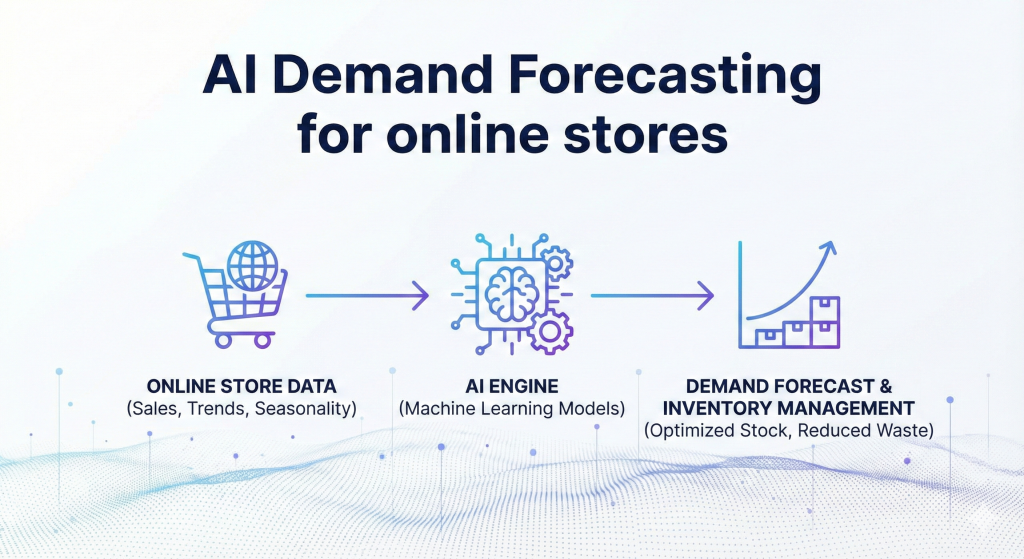
AI demand forecasting is a technology that uses machine learning to predict future sales. It looks at your sales history and combines it with external data like trends and seasonality. It finds hidden patterns that humans cannot see. It gives you a specific plan for what to buy and when to buy it.
You do not need to be a computer scientist to use this. You just need to understand what it does for you.
How does the computer know what people will buy?
The computer learns from patterns. It looks at millions of data points to see cause and effect. It notices that every time you run a specific type of ad, sales go up by 20%. It notices that when the temperature drops, sales of scarves go up. It uses these lessons to guess what will happen next.
Think of AI like a very smart, very observant shop assistant. This assistant has a perfect memory. They remember exactly what sold on every single day for the last five years.
They also read every newspaper and watch every weather report.
When you ask this assistant, “How many blue shirts will we sell next week?” they do not just guess. They say, “Well, last time it rained on a Tuesday, we sold 10 shirts. Next Tuesday it is supposed to rain. Also, we just sent an email coupon. So I predict we will sell 18 shirts.”
This is called “Machine Learning.” The machine learns from history.
The best part is that it keeps learning. If it predicts 18 shirts and you actually sell 20, it takes a note. It says, “Okay, I was a little low. Next time I will adjust my calculation.” It gets smarter every single day. Research shows this can reduce forecasting errors by 50%.2
What data does the AI use to make decisions?
AI uses a mix of your internal data and external market data. It looks at your sales history, inventory levels, and return rates. It also looks at seasonality, holidays, and marketing calendars. Some advanced tools even look at weather and economic news.
Here is the “food” that the AI eats to grow strong:
- Sales History: This is the basics. What did you sell yesterday? What did you sell last year?
- Seasonality: The AI knows that swimsuits sell in July and coats sell in December. It knows exactly when the shift happens.8
- Marketing Plans: You can tell the AI, “I am spending $5,000 on ads next week.” It knows that ads usually drive sales, so it increases the forecast.6
- Product Attributes: It looks at the SKU level. It knows that “Red” sells faster than “Green.” It knows that “Size Medium” sells twice as fast as “Size XXL”.9
- Lead Times: It watches your suppliers. If your supplier usually takes 10 days but lately has been taking 15 days, the AI notices. It tells you to order 5 days earlier to be safe.4
Which Shopify apps should I use to predict sales?
You should choose an app that fits your budget and your business size. For small to medium stores, Prediko is a great choice because it is easy to use and affordable. For larger, complex businesses with multiple warehouses, Inventory Planner by Sage is a strong option. For fast-growing brands that want to focus on cash flow, Cogsy is excellent.
Let us look at the top contenders.
Is Prediko the right choice for my store?
Prediko is ideal if you want a modern, easy-to-use tool that integrates deeply with Shopify. It is great for visual learners. It is also very affordable for smaller stores starting their journey.
The Good Stuff:
Prediko is built specifically for Shopify. It feels like a native part of the platform.
- Buying Table: This is a standout feature. It shows you a simple table of what you need to buy. It calculates your “Burn Rate” (how fast you are selling) and tells you exactly how many days of stock you have left.10
- Raw Materials: If you make your own products (like jewelry or candles), you need to track ingredients, not just finished goods. Prediko handles this well. It tells you to buy more wax or beads.11
- Pricing: It starts at $49/month. This is very competitive. It allows smaller shops to access powerful AI without breaking the bank.3
- Visuals: It uses great charts and graphs. It is easy to read.
Real World Proof:
A brand called CloudSharks used Prediko. They were growing fast and kept running out of stock. Prediko helped them see the future demand. They reduced their stockouts by 35%.12 That is a huge amount of revenue saved.
Another brand, Kate Hewko, used Prediko to clean up their messy inventory. They increased their inventory turnover by 40%. This means they sold through their stock much faster and kept cash moving. They also saved 10 hours a week on manual work.13
Should I use Inventory Planner by Sage?
Inventory Planner is a heavy-hitter. It is best if you are a larger business with complex needs. If you sell on Amazon, eBay, and Shopify all at once, or if you have three different warehouses, this is the tool for you.
The Good Stuff:
- Depth: This tool goes deep. It has over 200 metrics. You can analyze everything.
- Multi-Channel: It is very good at combining data from different places. If you sell in a physical store (POS) and online, it merges that data perfectly.14
- Customization: You can tweak every report.
The Not-So-Good Stuff:
- Price: It is more expensive. It starts around $119/month, but the price can go up quickly as you grow.15
- Complexity: It can be hard to learn. Some users find it “manual and complex” compared to newer tools.11 It feels a bit more like a spreadsheet on steroids.
Is Cogsy better for growing brands?
Cogsy is perfect if your main goal is aggressive growth. It focuses on “Operational Intelligence.” It helps you turn your inventory data into a growth plan. It is great for brands that do “backorders” (selling items before they arrive).
The Good Stuff:
- Sell on Backorder: Cogsy is famous for this. If you run out of stock, Cogsy helps you keep selling. It calculates exactly when the next shipment arrives and updates the “Ship Date” on your website. This lets you capture revenue even when your warehouse is empty.16
- Planning: It helps you build a 12-month growth plan. It turns your marketing goals into inventory needs.
- User Experience: It is very friendly and proactive. It acts like a partner.
The Cost:
It is pricier than Prediko. Plans start around $199/month.17 It is for brands that are already making good revenue and want to scale up to the next level.
Comparison Table: Which one wins?
| Feature | Prediko | Inventory Planner | Cogsy |
| Best For | SMBs & Makers | Large Multi-Channel | High-Growth Brands |
| Price | Starts $49/mo | Starts ~$120/mo | Starts ~$199/mo |
| Ease of Use | Very High | Medium | High |
| Key Feature | Raw Material Planning | Deep Reporting | Backorder Selling |
| Setup Time | Fast (< 2 weeks) | Slower | Consultative |
How do I calculate safety stock without a math degree?
Safety stock is your emergency stash. It is the extra inventory you keep just in case sales spike or a shipment is late. AI calculates this for you automatically. It constantly adjusts the number based on how reliable your supplier is and how volatile your sales are.
You need safety stock because the world is unpredictable. Maybe a truck breaks down. Maybe a celebrity mentions your product. If you have zero buffer, you crash.
What is the formula for safety stock?
The standard formula is: Safety Stock = (Max Daily Sales x Max Lead Time) – (Average Daily Sales x Average Lead Time). This looks at the worst-case scenario and subtracts the average scenario. The difference is your safety buffer.
Let us break this down with a Real World Example.
Imagine you sell coffee mugs.
- Average Scenario: You usually sell 10 mugs a day. It usually takes 10 days for new mugs to arrive from the factory.
- 10 mugs x 10 days = 100 mugs needed during the wait.
- Worst Case Scenario: On your busiest day, you sold 20 mugs. The factory was slow once and took 15 days.
- 20 mugs x 15 days = 300 mugs needed in a worst-case wait.
The Math:
300 (Max) – 100 (Average) = 200 mugs.
So, you should keep 200 extra mugs in your warehouse as safety stock.4
How does AI improve this calculation?
AI makes this calculation dynamic. A spreadsheet uses static numbers. It assumes your “Max Sales” is always 20. But what if it is December? Your max sales might be 50. AI changes the formula every day based on the season.
If you use a spreadsheet, you calculate this once a year. That is risky.
AI watches your supplier like a hawk. If your supplier starts being late—taking 12 days instead of 10—the AI notices immediately. It updates the “Average Lead Time” in the formula.
Suddenly, the AI tells you: “Hey, your supplier is getting slow. We need to increase safety stock from 200 to 220.”
It does this automatically. You do not have to do the math. You just stay protected.18
When should I reorder new stock?
You should reorder when your stock level hits the “Reorder Point.” The Reorder Point is your Lead Time Demand plus your Safety Stock. When you hit this number, you must place an order immediately to avoid running out.
Using our coffee mug example:
- You sell 10 a day.
- It takes 10 days to get stock.
- You need 100 mugs just to survive the wait.
- You have 200 mugs as safety stock.
Reorder Point = 100 + 200 = 300.
When you look in your warehouse and see 300 mugs left, you hit the “Buy” button.
If you wait until you have 200 mugs, you are too late. You are eating into your safety buffer. If anything goes wrong, you will stock out.
AI tools set alerts for this. You get an email or a Slack message: “Mug Inventory at 300. Reorder now.”.18
How do I plan my buying budget for next quarter?
You need an Open-to-Buy (OTB) plan. This is a financial budget that tells you how much inventory you can buy to meet your sales goals without overspending. It prevents you from tying up all your cash in stock. It ensures you have enough cash flow to pay your other bills.
Think of OTB like a diet for your inventory. You have a calorie limit (budget). You want to spend those calories on the best food (best-selling products). You do not want to binge and feel sick (overstock).
What goes into an Open-to-Buy plan?
An OTB plan looks at your sales goal, your current stock, and the stock you have already ordered. It subtracts what you have from what you need. The remainder is what you are “Open to Buy.”
Here is the logic:
- Sales Goal: “I want to sell $50,000 worth of goods next month.”
- Ending Inventory Goal: “I want to have $10,000 worth of stock left on the shelves at the end of the month (so I do not look empty).”
- Total Need: $50,000 + $10,000 = $60,000 worth of goods needed.
- Current Stock: “I currently have $20,000 worth of goods.”
- On the Way: “I have a shipment of $5,000 coming next week.”
- Total Have: $20,000 + $5,000 = $25,000.
The Calculation:
Total Need ($60,000) – Total Have ($25,000) = $35,000.
Result: You are “Open to Buy” $35,000 worth of inventory.
If you buy $50,000, you are overstocked. You spent cash you did not need to spend.
If you buy $20,000, you are understocked. You will miss your sales goal.
How does AI help with OTB?
AI makes your Sales Goal accurate. If your sales goal is wrong, your whole plan fails. AI predicts revenue accurately so your budget is realistic. It also lets you run “What If” scenarios to see how changes affect your cash.
In Excel, you might guess, “I think sales will grow 10%.”
The AI says, “Actually, based on current trends and the upcoming holiday, sales will grow 18%.”
This changes your OTB number completely. It ensures you have enough cash to fund that 18% growth.
Tools like Cogsy are great at this. They visualize your cash flow. They show you a graph. “If you buy this stock now, your bank balance will look like this in 60 days.” This helps you sleep better at night.16
How do I start using AI for my store today?
Start by cleaning your data. AI needs good data to learn. Then, pick a tool like Prediko or Cogsy and connect it to your Shopify store. Run a pilot test with your top products to trust the numbers. Finally, automate your reordering alerts so you never miss a beat.
You do not have to change everything overnight. You can take baby steps.
Step 1: Clean your data
You need to fix your product information in Shopify. Ensure every product has a cost price (COGS) entered. Check that your SKUs are consistent. If you have duplicate products or old test products, delete them or hide them.
“Garbage in, garbage out.” If you tell the AI that a shirt costs $0, it will think you have infinite profit margins. It will give you bad advice.
Go into Shopify. Check your “Cost per Item” field. Fill it in for every single variant.
Check your supplier lead times. If you know a supplier takes 30 days, make sure that is recorded somewhere.19
Step 2: Choose your tool and connect
Sign up for a free trial of an AI app. Most connect with one click. You authorize the app to read your Shopify data. It will take a few hours to download your history and “crunch the numbers.”
Do not be afraid of the tech. It is plug-and-play. You do not need to code.
Prediko and Cogsy both offer easy onboarding. They usually have a “Setup Wizard” that walks you through it.17
Step 3: Run a pilot test
Do not trust the AI blindly on day one. Pick your top 20 best-selling products. Compare the AI’s forecast with your own spreadsheet forecast. See which one is closer to reality over the next month.
This builds trust. You will likely see that the AI catches trends you missed.
For example, you might think sales are flat, but the AI notices a 5% week-over-week increase and suggests buying more. If sales do go up, you know the AI was right.20
Step 4: Automate your alerts
Use Shopify Flow to automate the boring stuff. Set up a workflow: “If inventory drops below Reorder Point, send me an email.” This turns your inventory management into a passive notification system.
Real World Example: Doe Beauty
Doe Beauty used Shopify Flow to automate 80% of their tasks. They set up simple rules.
- If a bundle is selling too fast, stop the discount (to save margin).
- If stock is low, alert the team.
This saved them 4 hours a week. That is half a day of work! They also saved $30,000 a month by catching margin leaks.21
You can do this too. Shopify Flow has a new feature called “Sidekick.” You can just type in plain English: “Email me when inventory is low.” The AI builds the automation for you.22
What happens if I ignore this technology?
If you ignore AI, you will continue to struggle with stockouts and cash flow crunches. Your competitors who use AI will have better availability and lower costs. They will grow faster than you. Eventually, manual spreadsheets will become a competitive disadvantage that puts you out of business.
The gap is widening. Brands using AI are getting smarter. They are reducing their inventory costs by up to 75%.23 They are increasing their revenue by having products in stock when customers want them.
If you stay on spreadsheets, you are fighting a tank with a stick. You are working harder, but achieving less.
The future is even crazier. Soon, we will have “AI Agents.” These are bots that do not just tell you to buy; they place the order for you. They will negotiate with suppliers. They will adjust prices on your website in real-time to manage demand.24
You need to get on the train now. Start with forecasting. Get your data clean. Get your cash flow optimized.
Conclusion
Managing inventory does not have to be a nightmare. You do not have to live in fear of the “Out of Stock” label. You do not have to bury your cash in a warehouse full of products that nobody wants.
The tools exist today to solve this. AI demand forecasting is accessible, affordable, and powerful. It takes the guesswork out of your business. It turns your inventory from a chaotic mess into a well-oiled machine.
By switching to AI, you are not just buying software. You are buying peace of mind. You are buying time. You are buying the ability to scale your business without breaking your bank account.
So, here is the question you need to answer today: Are you ready to stop guessing and start knowing exactly what your future looks like?
Works cited
- Why Your Shopify Inventory Management Is Costing You Money – Tightly, accessed December 16, 2025, https://tightly.io/newsroom/why-your-shopify-inventory-management-is-costing-you-money
- What is AI demand forecasting? – IBM, accessed December 16, 2025, https://www.ibm.com/think/topics/ai-demand-forecasting
- Pricing & Plans for Shopify Inventory Management App – Prediko, accessed December 16, 2025, https://www.prediko.io/pricing
- How to Calculate Safety Stock for Shopify Stores, accessed December 16, 2025, https://forstock.io/blog/calculate-safety-stock-shopify-stores
- How to Create an Open-to-Buy Template for Your Retail Business – Inventory Planner, accessed December 16, 2025, https://www.inventory-planner.com/otb-template/
- Out-of-stocks: The $1.2T eCommerce inventory management problem crushing retailers, accessed December 16, 2025, https://www.mirakl.com/blog/out-of-stocks-ecommerce-inventory-management-problem
- Is AI Demand Forecasting Better Than Excel and Spreadsheets? – Intuendi, accessed December 16, 2025, https://intuendi.com/ai-demand-forecasting-vs-excel/
- What Is AI Demand Forecasting? Use Cases For Ecommerce (2025) – Shopify, accessed December 16, 2025, https://www.shopify.com/blog/ai-demand-forecasting
- 5 Steps to Use AI Inventory Forecasting – ConverSight, accessed December 16, 2025, https://conversight.ai/blog/5-steps-use-ai-inventory-forecasting/
- Prediko’s AI Inventory Management Shopify App – YouTube, accessed December 16, 2025, https://www.youtube.com/watch?v=QOq0PtvNZw8
- Inventory Planner vs Cogsy and the Best Alternative – Prediko, accessed December 16, 2025, https://www.prediko.io/inventory-planner-vs-cogsy-vs-prediko
- Cloudsharks achieves 35% fewer stockouts | Prediko Success Story, accessed December 16, 2025, https://www.prediko.io/case-studies/35-fewer-stockouts-cloudsharks-optimizes-inventory-operations-with-prediko
- How Kate Hewko boosted Inventory efficiency by 40% | Prediko …, accessed December 16, 2025, https://www.prediko.io/case-studies/how-kate-hewko-boosted-inventory-efficiency-by-40-with-prediko
- Product Availability: How to Measure and Improve It (2026 Guide) – Shopify Indonesia, accessed December 16, 2025, https://www.shopify.com/id/blog/product-availability
- Complete Buying Guide for Inventory Planning Software, accessed December 16, 2025, https://www.inventory-planner.com/inventory-planning-software-guide/
- Top 10 Prediko Alternatives for Shopify & Multichannel Sellers, accessed December 16, 2025, https://www.sumtracker.com/blog/prediko-alternatives-for-shopify-multichannel-sellers
- Cogsy Alternatives? Try Prediko’s AI Powered App, accessed December 16, 2025, https://www.prediko.io/cogsy-alternatives
- Inventory Management: How it Works and Tools (2025) – Shopify, accessed December 16, 2025, https://www.shopify.com/retail/inventory-management
- The Ultimate Guide to Using AI for Smarter Inventory Forecasting in Power Tools, accessed December 16, 2025, https://www.bettercommerce.io/blog/the-ultimate-guide-to-using-ai-for-smarter-inventory-forecasting-in-power-tools
- 10-Point Checklist: Implementing AI Inventory Forecasting – Marketsy.ai, accessed December 16, 2025, https://marketsy.ai/blog/10-point-checklist-implementing-ai-inventory-forecasting
- Shopify Flow: A comprehensive guide, Workflow ideas, and Case Studies, accessed December 16, 2025, https://avada.io/blog/shopify-flow/
- How Shopify Flow Automation Got Faster, Safer, and Smarter in 2025, accessed December 16, 2025, https://www.shopify.com/blog/flow-automation-updates-2025
- Best Shopify AI Apps to Convert More in 2026 – Uxify, accessed December 16, 2025, https://uxify.com/blog/post/best-shopify-ai-apps
Inventory Management AI Agents: Types & How To Use Them – Domo, accessed December 16, 2025, https://www.domo.com/glossary/inventory-management-ai-agents