
Introduction
You are likely feeling overwhelmed by the lightning speed of artificial intelligence updates. Just as you master one tool, the entire landscape shifts beneath your feet, and a new framework appears that everyone says you must use. This is exactly what is happening right now with the debate of LangChain vs LangGraph. If you are building AI applications, you have certainly heard these names in every developer chat and tech blog. It is confusing to know which one to pick or if you actually need both to succeed.
This report is here to clear up that confusion for you. We will not just list features. We will look at the real problems these tools solve for you. Think of LangChain as your standard toolbox. It has everything you need to build a straightforward linear application, like a chatbot that answers questions from a document. It is easy to pick up and great for getting started quickly.1
However, as your apps get more complex, you might hit a wall. Maybe you need your AI to loop back and check its own work, or you need multiple AI agents to talk to each other. That is where LangGraph enters the picture. It handles messy workflows where the path is not a straight line.1 By the end of this report, you will understand exactly how these frameworks differ and which one fits your project.
Key Takeaways
- LangChain is for Linear Paths: It excels at straightforward sequences where step A leads directly to step B. This makes it perfect for simple prototypes and basic retrieval apps where you do not need the AI to loop back.2
- LangGraph is for Loops and Logic: If your app needs to make decisions, retry failed steps, or manage complex interactions between multiple agents, LangGraph provides the necessary control structure.1
- They Work Together: You do not have to choose one over the other. LangChain offers the building blocks like models and prompts, while LangGraph acts as the architect that arranges them into sophisticated flows.4
- State Management is the Big Differentiator: LangChain passes data like a hot potato from one step to the next. LangGraph keeps a central memory that every step can read and update, which is crucial for complex apps.6
- Production Readiness: For a hobby project, LangChain chains are fine. For a robust product that can recover from errors and handle human input, LangGraph is the professional choice.9
The Core Concept: Chains vs. Graphs
What is the fundamental difference in how they work?
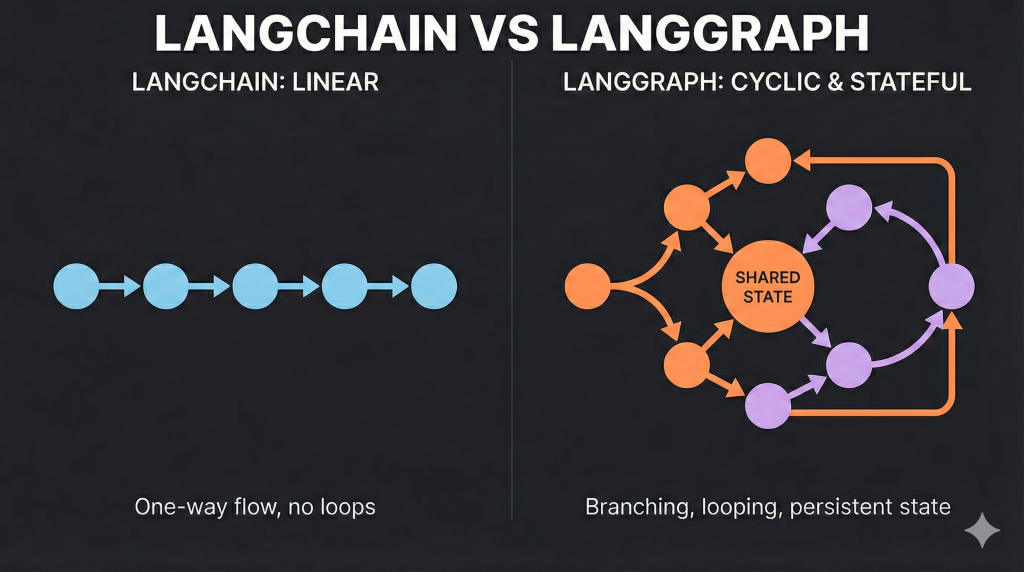
The main difference lies in the direction of the workflow. LangChain operates as a linear chain where data flows in one single direction from start to finish without looking back. LangGraph operates as a cycle where data can loop back to previous steps, allowing the system to retry tasks or refine answers based on new information.1
To truly understand the situation between these frameworks, you need to visualize how data moves through them. The names themselves give away the secret.
LangChain is a Chain.
Imagine an assembly line in a factory. A raw material, which is your user’s prompt, is placed on the conveyor belt. It moves to the first station and gets processed. Maybe a prompt template adds context at this stage. Then it moves to the next station where a language model generates a response.
Finally, it goes to the output parser station that cleans it up. The movement is strictly one-way. It goes from the start to the finish. If something goes wrong at step 3, the factory does not naturally know how to send it back to step 2 to fix it. This is technically called a Directed Acyclic Graph or DAG.11 The word “Acyclic” simply means there are no cycles or loops. This structure is fantastic for predictable tasks. If you want to take a document, summarize it, and translate it, a chain is the most efficient way to do it.1
LangGraph is a Graph.
Now you should imagine a team of doctors working on a complex diagnosis. They do not just follow a checklist from top to bottom. They might run a test, look at the results, and then decide what to do next. If the results are inconclusive, they might run the test again. This is a loop. If the results suggest a specific condition, they might call in a specialist. This is branching. They constantly update a central patient file with new information. This is a cyclic graph.12
LangGraph allows the application to cycle back to previous steps. It enables the AI to think about its progress and change course if necessary. This capability is essential for building agents. These are AI systems that can reason and act autonomously.1
Table 1: Workflow Architecture Comparison
| Feature | Linear Workflow (LangChain) | Cyclic Workflow (LangGraph) |
| Structure Type | Directed Acyclic Graph (DAG) | Cyclic State Graph |
| Direction | One-way (Start to End) | Multi-directional (Loops enabled) |
| Decision Making | Pre-determined sequence | Dynamic real-time decisions |
| Error Handling | Stops or fails on error | Can loop back to retry |
| Best Analogy | Factory Assembly Line | Doctor’s Diagnosis Process |
Why does “Cyclic” matter for AI agents?
Cyclic behavior allows an AI to correct its own mistakes and improve its work over time. Unlike standard software that follows a rigid set of instructions, AI models are probabilistic and make errors. A cycle lets the AI check its output and try again until it gets the right answer, which is essential for reliability.1
You might wonder why you would ever need a loop in software. Is efficient code not supposed to run straight through? In traditional programming, yes. But with AI, we are dealing with probabilistic models. They make mistakes. If you ask an AI to write code, it might make a syntax error. In a linear LangChain flow, the process would just fail or output bad code.
In a cyclic LangGraph flow, you can add a step that checks the code. If it finds an error, the path between steps can loop back to the code-generation step with an instruction to fix the error you just made. This loop can repeat until the code works or a limit is reached.1
This cycle is the heartbeat of an intelligent agent. It allows for self-correction. It fixes mistakes before showing the user. It allows for refinement. It polishes an answer until it meets a quality standard. It allows for multi-turn reasoning. It breaks a complex problem into steps and solves them one by one. It loops as needed. This shift from linear to cyclic is what separates a simple chatbot from a powerful autonomous agent.
How do Directed Acyclic Graphs differ from Cyclic Graphs?
A Directed Acyclic Graph (DAG) moves in one direction and never visits the same node twice, making it perfect for straightforward recipes. A Cyclic Graph contains loops that allow the system to return to a previous state, which is necessary for tasks that require repetition, iteration, or ongoing management of a process.11
Think of a DAG like baking a cake. You mix the flour. You add the eggs. You bake it. You frost it. You cannot un-bake the cake to add more eggs once it is in the oven. The process only moves forward. This is efficient and easy to understand. It is great for data processing pipelines where you know exactly what needs to happen to the data at every step.16
Think of a Cyclic Graph like playing a board game. You might land on a square that sends you back to the start. You might get stuck in a loop where you have to roll a six to get out. You revisit the same spots on the board but with different dice rolls or different items in your inventory. This complexity allows for much richer interactions. It allows the game to last as long as needed rather than finishing in a set number of steps.13 In the world of AI, this means your agent can spend as much time as it needs to solve a hard problem. It is not forced to give an answer after step three if it is not ready.
State Management: The Brain of the Operation
How do they handle memory and context?
LangChain typically passes memory as part of the prompt history in a linear fashion, which can get messy. LangGraph uses a centralized state object that persists across every step of the workflow. This acts like a shared memory bank that every part of your application can read from and write to at any time.6
This is arguably the most technical but important distinction between the two. It determines how smart your application can actually be.
LangChain’s Approach: Passing the Baton
In a standard LangChain sequence, data is passed directly from one component to another. Step 1 finishes and hands its output to Step 2. Step 2 takes that input, does its job, and hands it to Step 3. Step 3 generally does not know what happened at Step 1 unless you explicitly bundle that information and drag it along. For simple conversations, LangChain uses Memory classes like ConversationBufferMemory to store the chat history. It essentially appends the history to the prompt every time. This works, but it can get messy if you have complex branching logic. You have to manually ensure the right context is passed to the right place.7
LangGraph’s Approach: The Central Blackboard
LangGraph introduces a concept called State. Think of State as a shared blackboard in the middle of the room. Every node or step in your workflow can step up to the blackboard. They can read what is written there. They can write something new or change existing information. When you define a LangGraph, you define the schema of this State. It is usually a Python dictionary or a Pydantic model. It tracks everything. It tracks the user’s initial message. It tracks the current plan. It tracks the tools that have been called. It tracks the results of those tools. It tracks any errors that occurred.6
This centralization changes everything.
- Persistence: LangGraph can save this State to a database after every step. This is called checkpointing. If your server crashes, you can reload the State and resume exactly where you left off. LangChain cannot easily do this.7
- Time Travel: Because every state change is recorded, you can actually look back at the history of the execution. You can rewind the agent to a previous state. You can change a value, like correcting a bad decision. You can let it run forward from there. This is incredibly powerful for debugging and human oversight.9
- Shared Context: If you have multiple agents working together, such as a researcher and a writer, they do not need to constantly message each other every detail. They just look at the shared State to see what the other has done.8
Real World Example: The “Detective” Metaphor
A LangChain agent acts like a detective who must carry every piece of evidence in their hands as they run from room to room. A LangGraph agent acts like a detective who writes everything down in a case file that they can reference, update, and review at any time without fear of dropping crucial information.20
To visualize this, think of a detective solving a crime.20
The LangChain Detective:
This detective runs from room to room. In the kitchen, he finds a knife. He runs to the living room, holding the knife. In the living room, he finds a glove. Now he is holding a knife and a glove. He runs to the study. If he drops the knife along the way, he forgets about it. He focuses only on what is immediately in front of him or what he is carrying. This detective is fast but can easily lose track of the bigger picture if the case gets complicated.
The LangGraph Detective:
This detective has a case file, which is the State. When he finds a knife, he takes a photo and notes it in the file. He leaves the knife in evidence and moves to the living room. He finds the glove and updates the file. Later, when he is interviewing a suspect, he does not need to be holding the knife. He just references the case file. If he hits a dead end, he opens the file. He looks at his previous notes. He decides to go back to the kitchen to look for missed clues. This looping back is possible because he has a persistent record of what he has already done.
Why is persistence crucial for production apps?
Persistence ensures that your application does not lose its place if it is interrupted or if a process takes a long time. It allows you to save the exact state of the conversation and resume it days later, or recover gracefully if the system crashes in the middle of a complex task.3
Imagine you are building a travel booking assistant. A user asks to book a flight. The agent finds a flight but needs the user to confirm the price.
In a system without persistence, if the user closes their browser and comes back an hour later, the agent might forget the flight details. It might force the user to start over.
With LangGraph’s persistence, the “State” is saved to a database. When the user returns, the agent loads the State. It sees that it was waiting for a confirmation. It picks up exactly where it left off. This is vital for long-running workflows where an agent might need to wait for a human to approve an action or for an external API to return a slow result.3
Architecture and Control Flow
How do you build workflows in each?
LangChain uses a composition syntax that feels like piping commands together in a line. LangGraph uses a node-and-edge syntax where you explicitly define functions and the connections between them, giving you granular control over the logic and flow of the application.18
The developer experience differs significantly because of the underlying philosophy.
LangChain: The Composition API
LangChain uses the LangChain Expression Language (LCEL). It uses the pipe symbol | to chain things together. It looks like Unix commands.
chain = prompt | model | output_parser
This is elegant and declarative. It is easy to read if you know the syntax. You can see exactly how data flows. It goes from left to right. However, adding conditional logic like if-then-else to this pipe can make the code look complicated and hard to read. It requires special wrapper functions like RunnableBranch which can feel clunky for complex logic.10
LangGraph: Nodes and Edges
LangGraph feels more like standard Python programming mixed with graph theory. You explicitly define:
- Nodes: These are just Python functions. They take the current State. They do some work, like calling an LLM. They return an update to the State.
- Edges: These connect the nodes. You say, “After Node A finishes, go to Node B.”
- Conditional Edges: This is the magic. You define a function that looks at the State and decides where to go next. “If the State says the answer is ‘good’, go to End. If the State says ‘bad’, go back to the Rewrite Node”.12
This explicit definition makes complex logic much easier to handle. You are not trying to shoehorn a loop into a linear pipe. You are simply drawing the loop on the map.3
Comparing the Code Structure
LangChain code focuses on the sequence of operations, while LangGraph code focuses on the structure of the system. LangGraph requires more setup code to define the graph, but this investment pays off by making it easier to modify and extend the logic later on.17
Let’s look at how you might structure a simple request in both.
LangChain Style (Simplified):
You define the sequence. It is rigid.
- Input: “Tell me a joke.”
- Step 1 (Prompt): Formats it.
- Step 2 (Model): Generates the joke.
- Output.
LangGraph Style (Simplified):
You define the map.
- Define State: class State(TypedDict): messages: list
- Define Node: def chatbot(state): return call_model(state)
- Define Graph: graph = StateGraph(State)
- Add Node: graph.add_node(“chatbot”, chatbot)
- Set Entry: graph.set_entry_point(“chatbot”)
- Compile: app = graph.compile()
While LangGraph requires more boilerplate code to set up, such as defining the state, nodes, and edges, this setup pays off immediately when you need to add a feature. Want to add a human approval step? In LangChain, you might have to rewrite your whole chain. In LangGraph, you just add a new node and an edge pointing to it.23
Table 2: Coding Patterns
| Aspect | LangChain Pattern | LangGraph Pattern |
| Syntax | `Chain = A | B |
| Logic | Implicit in the chain | Explicit in conditional edges |
| Functionality | “Do this, then do that.” | “Go here. Then decide where to go next.” |
| Modularity | Components are tightly bound | Nodes are independent functions |
| Extensibility | Harder to insert new steps | Easy to add new nodes/edges |
Human-in-the-Loop (HITL)
Why is human interaction a game changer?
Human-in-the-loop allows you to pause an AI workflow so a person can review, edit, or approve the next action. This is critical for safety and accuracy in high-stakes environments like finance or customer support where you cannot afford for the AI to make a mistake.9
In the early days of LLM apps, we just fired off a prompt and hoped for the best. For production apps in banking, healthcare, or customer support, hoping is not good enough. You need a human to double-check things. LangGraph treats Human-in-the-Loop as a first-class citizen. It is not an afterthought. The framework is designed around it. Because LangGraph has persistence, meaning it saves the state after every step, you can literally pause the AI.
- The Pause: You can tell the graph to pause before executing the ‘Send Email’ node.
- The Review: The system stops. It saves the state, which contains the draft email. It sends a notification to a human.
- The Edit: The human opens the UI. They read the draft. They maybe spot a typo. They edit the state directly.
- The Resume: The human clicks Approve. The graph wakes up. It loads the updated state with the typo fixed. It proceeds to the ‘Send Email’ node.9
In LangChain, achieving this level of interaction requires complex custom engineering. You would have to build your own database to save the conversation. You would have to write logic to stop the chain. You would have to figure out how to restart it with new inputs. LangGraph gives you this for free.2
Real World Use Case: Customer Support Bot
In a customer support scenario, an AI can handle routine questions but must stop for approval before issuing a refund. This setup ensures speed for simple tasks while maintaining strict control over actions that cost money.28
Imagine a bot that processes refunds.
- Step 1: Bot collects user info.
- Step 2: Bot determines the refund amount.
- Step 3: Bot checks if the amount is over $100.
- If under $100: Bot processes it automatically.
- If over $100: Bot enters a “Manager Approval” state. The workflow halts. A manager logs in, sees the request, and clicks “Approve.” Only then does the bot continue to transfer the money.
This interrupt pattern is vital for safety and trust. LangGraph handles the complex plumbing of pausing and resuming the Python process so you do not have to.29
How does “Time Travel” help debugging?
Time Travel allows developers to rewind the agent’s actions to a specific point in the past to see exactly what went wrong. You can then replay the action with different inputs to test fixes, which makes fixing bugs in complex logic much faster and less frustrating.9
Debugging AI is notoriously difficult because the outputs can change every time. With LangGraph’s Time Travel, you are not just looking at logs. You are interacting with the past. If your agent made a bad decision at Step 5, you can rewind the state to Step 4. You can tweak the prompt or the input data. You can run Step 5 again to see if the result improves. This interactive debugging loop is far superior to simply reading a text file of errors.31
Multi-Agent Orchestration
When is one brain not enough?
Complex tasks often require specialized skills that a single generic AI prompt cannot handle well. By using multiple agents that act as specialists, like a researcher, a writer, and an editor, you can achieve higher quality results than by asking one agent to do everything at once.3
We are moving away from having one giant prompt that does everything. It is often better to have specialized agents.
- Agent A (Researcher): Good at searching Google and finding facts.
- Agent B (Writer): Good at taking facts and writing a blog post.
- Agent C (Editor): Good at fixing grammar and tone.
LangGraph is designed to be the manager of this team. It orchestrates the handoffs.
How LangGraph manages the team:
You can build a “Supervisor” node. This node uses an LLM to decide who should work next.
- The User asks a question.
- The Supervisor looks at the question. “This needs research,” it thinks.
- It routes the state to the Researcher node.
- The Researcher adds findings to the state and passes it back to the Supervisor.
- The Supervisor sees the data is there. “Now it needs writing,” it thinks.
- It routes the state to the Writer node.
This hierarchical structure is very difficult to build in standard LangChain but is a natural fit for LangGraph’s node-edge architecture.3
The “State Explosion” Problem
When many agents constantly write to the same shared memory, the context can become too large and confusing for the AI to handle. To prevent this, you must carefully design your state schema to ensure agents only see and touch the data they actually need.33
One challenge with multi-agent systems in LangGraph is that the State can get very large. If ten agents are all dumping their thoughts into one shared document, it can become a mess. This is known as State Explosion or Context Pollution. LangGraph helps manage this by allowing you to define strictly what parts of the state each agent can see or write to, although this requires careful design by the developer. It forces you to be disciplined about your data structure, which prevents bugs down the road.33
Cost Management in Multi-Agent Systems
Running multiple agents means making multiple calls to paid language models, which can quickly become expensive. You need to implement strict controls and limits on how many times agents can loop or call each other to prevent a runaway bill.33
A hidden danger of multi-agent systems is the cost. If you have a loop where Agent A talks to Agent B, and they get stuck in an argument or a polite “thank you” loop, you are paying for every single message. LangGraph allows you to set a recursion_limit (a maximum number of steps) to prevent infinite loops. This is a crucial safety feature for your wallet.33
Debugging and Developer Experience
Dealing with the “Black Box“
Developers often feel frustrated when they cannot see why an AI application failed. LangChain’s complex chains can sometimes hide errors, but LangGraph combined with observability tools illuminates the internal logic so you can see exactly where the process broke.34
One of the biggest complaints about LangChain was that it felt like a black box. You called a function, and magic happened. But if it broke, it was hard to see where inside the chain it failed.34 LangGraph, combined with LangSmith which is a monitoring platform, changes this experience.
- Visual Graphs: LangGraph Studio offers a visualizer. You can actually see your graph drawn out. You can watch the green light move from node to node as it executes.
- Step-by-Step Tracing: You can click on any node in the visualizer and see exactly what the input was and what the output was.
- Interactive Testing: You can change the input to a node in the middle of a run to see how the downstream nodes react. This is a game-changer for testing edge cases.9
While LangChain has tracing too, LangGraph’s visual nature makes it much easier to understand the logic flow or the “why” rather than just the sequence of events or the “what”.37
The Learning Curve
LangGraph is harder to learn initially because it requires understanding software engineering concepts like graphs, state, and schema. LangChain is easier for beginners because it abstracts these details away, but this simplicity can become a limitation as you grow.38
We have to be honest. LangGraph is harder to learn than LangChain.
- LangChain: You can copy-paste a code snippet and have a chatbot running in 5 minutes. It abstracts away a lot of the complexity.
- LangGraph: You need to understand concepts like State, Nodes, Edges, and Reducers. You are writing more code. You are defining classes. It feels more like software engineering and less like scripting.38
However, experienced developers often find LangGraph less frustrating in the long run. Why? Because it is less magical. You write the functions. You control the flow. If something breaks, it is usually in your code, not deep inside a library’s abstraction layer. It gives you control back.5
LangGraph Studio: A Visual IDE
LangGraph Studio is a specialized development environment that lets you visualize your agent’s brain as a graph. It allows you to interact with the agent, inspect its memory, and debug issues in a way that standard code editors cannot match.9
LangGraph Studio is not just a debugger. It is an Integrated Development Environment (IDE) for agents.
- Visualization: It draws the circles and arrows of your graph automatically from your code.
- Interaction: You can chat with your agent in the studio.
- State Inspection: You can see the exact contents of the State at any moment.
- Hot Reloading: When you change your code, the Studio updates instantly. This speeds up the trial-and-error process of prompt engineering significantly.32
Table 3: Developer Tools Comparison
| Feature | Standard Logging | LangGraph Studio |
| Visibility | Text-based logs | Graphical interface |
| Interactivity | Passive (read-only) | Active (can edit state) |
| Context | Hard to trace history | Visual history playback |
| Setup | Easy (print statements) | Requires local server setup |
| Best For | Quick scripts | Complex agent development |
Migration: Moving from Agents to Graphs
Is the old way dead?
Yes, the old AgentExecutor class in LangChain is being deprecated, meaning it will no longer receive major updates. The creators strongly recommend moving to LangGraph for all new agent development to ensure your code is future-proof and reliable.42
If you have been using LangChain’s AgentExecutor, which was the old way of building agents, you need to know that it is effectively being deprecated in favor of LangGraph.
Why the switch?
AgentExecutor was a great starting point, but it was a black box. It had a hard-coded loop: Think, Act, Observe, Repeat. If you wanted to customize that loop, such as adding a step to ask a human for help, it was very difficult. LangGraph allows you to recreate AgentExecutor but with all the internal machinery exposed. You can see the loop. You can break the loop. You can insert steps into the loop.
How to migrate: A Step-by-Step Guide
Migrating requires you to unwrap the logic from the old black box and explicitly define the steps yourself. You will keep your prompts and tools, but you will rewrite the logic that connects them using the graph structure.42
The migration isn’t about rewriting your prompts or tools. Those stay the same. It is about rewriting the loop.
- Define State: Instead of relying on hidden internal variables, you define a State class that holds your messages.
- Create Nodes: Wrap your model call in a function. Wrap your tools in a ToolNode.
- Define Logic: Instead of initialize_agent, you define a StateGraph.
- Connect: You connect the Model node to the Tool node with a conditional edge.
- Compile: You compile the graph into an executable app.
This might feel like extra work at first. But once you do it, you have total control. You can add a logging step. You can add a safety check. You can add a second model. You are no longer restricted by what the AgentExecutor allowed you to do.44
What are the real-world performance trade-offs?
Does LangGraph make my app slower?
LangGraph itself adds very little overhead, but the complexity of the workflows it enables can increase latency. The more steps and loops you add to your graph, the longer it will take for the agent to finish its task, so you must balance intelligence with speed.9
Strictly speaking, LangGraph is very lightweight. It does not add significant processing time to your Python code. However, because it encourages you to build complex loops, you might end up building agents that take a long time to answer.
- Linear Chain: 1 LLM call. Time: 2 seconds.
- Cyclic Graph: Plan -> Draft -> Critique -> Revise. 4 LLM calls. Time: 8 seconds.
You have to decide if the higher quality of the answer is worth the extra wait time for the user. For a chat bot, 8 seconds is a long time. For a research assistant that writes a report, 8 seconds is very fast. Context is key.
Complexity vs. Capability
LangGraph increases the complexity of your code, which increases the chance of bugs and the difficulty of maintenance. You should only use it when the capabilities it provides, like loops and memory, are absolutely necessary for your problem.22
There is a trade-off.
- LangChain: Low complexity, Low capability ceiling.
- LangGraph: High complexity, High capability ceiling.
Do not use a tank to go to the grocery store. If LangChain can solve your problem, use it. Only upgrade to LangGraph when you need the heavy armor.
Conclusion: Which One Should You Choose?
You are at a crossroads. Which path do you take?
Choose LangChain if:
- You are a beginner. You just want to see how LLMs work.
- You are building a prototype. You need to show your boss a working demo by tomorrow.
- Your task is linear. Input to Processing to Output. Examples include simple RAG, summarization, and translation.
- You do not need memory across sessions. The interaction is one-and-done.
Choose LangGraph if:
- You are building a product. You need reliability, error handling, and the ability to fix bugs easily.
- Your workflow has loops. The AI needs to critique its own work or retry if it fails.
- You need Human-in-the-Loop. You want a human to approve actions before they happen.
- You have multiple agents. You need to coordinate a team of specialized AIs.
- You need persistent state. You want the user to be able to close the browser, come back tomorrow, and pick up exactly where they left off.
Think of it like building with LEGOs. LangChain gives you pre-assembled kits like a car or a castle. They are quick to build but hard to modify. LangGraph gives you the individual bricks and a baseplate. You have to design the structure yourself, but you can build anything you can imagine, and you can change it whenever you want.
The Final Word:
Do not view this as a war where one side must die. It is an evolution. LangGraph stands on the shoulders of LangChain. It uses LangChain’s excellent integrations and tools but arranges them in a smarter, more resilient way. As AI applications move from cool demos to critical business tools, the shift toward the control and structure of LangGraph is inevitable. Start with chains to learn, but build with graphs to last.
What about you?
Are you currently struggling with a “spaghetti code” chain that needs to be untangled? Or are you just starting your first agent? What is the one feature you wish these frameworks handled better? Let me know in the comments below. I would love to hear your war stories from the trenches of AI development.
Detailed Feature Comparison Table
| Feature | LangChain (Chains) | LangGraph (Graphs) |
| Primary Structure | DAG (Directed Acyclic Graph) – Linear | Cyclic Graph – Loops & Cycles |
| Best For | Simple sequences, RAG, Prototypes | Agents, Complex Logic, Multi-Agent Systems |
| State Management | Passing data between steps (Ephemeral) | Centralized, Persistent State Object |
| Control Flow | Hard-coded sequences | Conditional Edges, Branching, Looping |
| Human-in-the-Loop | Difficult (requires custom hacks) | Native (Interrupt, Edit, Resume) |
| Persistence | Requires external memory handling | Built-in Checkpointers (Database integration) |
| Debugging | Trace-based (can be opaque) | Visual Graph Replay & Time Travel |
| Learning Curve | Low (Easy to start) | Medium/High (Requires graph theory basics) |
| Flexibility | Low (Rigid pipelines) | High (Fully customizable flows) |
| Streaming | Token streaming supported | Token & Node-level Event streaming |
Technical Glossary
- Agent: An AI system that uses an LLM to decide what actions to take and in what order.
- DAG (Directed Acyclic Graph): A fancy way of saying “a one-way street.” The process moves forward and never loops back.
- Node: A single step in a LangGraph workflow. It is usually a function that performs a task like “Call LLM” or “Search Wikipedia”.
- Edge: The connection between nodes. It tells the graph where to go next.
- State: A dictionary or object that holds all the information the application knows (messages, variables, errors). It is passed to every node.
- Schema: The definition of what the State looks like. It is the blueprint for your application’s memory.
- Recursion: When a process calls itself. In LangGraph, this allows an agent to loop and repeat a step, like “try again”, until it succeeds.
- Checkpointer: A mechanism in LangGraph that saves the State to a database at every step, allowing for pause and resume functionality.
Before and After: Code Thinking
To make this concrete, let’s look at how your “thinking” changes when you move from LangChain to LangGraph.
The Task: A simple bot that checks the weather. If the weather is bad, it writes a short poem about rain.
LangChain Thinking (Linear):
- “I will make a tool that gets the weather.”
- “I will make a prompt that asks for the weather.”
- “I will pipe the prompt into the LLM.”
- “I will pipe the output to a function that checks if it says ‘rain’.”
- “Wait, if it is raining, I need to call the LLM again to write a poem. But my chain is already done. I need a router to decide which chain to run. This is getting complicated.”
LangGraph Thinking (Cyclic):
- “I will define my State: { location: str, weather: str, poem: str }.”
- “I will make a Node: GetWeather. It updates weather in the State.”
- “I will make a Node: WritePoem. It reads weather and updates poem.”
- “I will make a Conditional Edge: Look at weather.”
- If ‘rain’: Go to WritePoem.
- If ‘sunny’: Go to End.
- “I connect Start -> GetWeather. Then the Edge handles the logic. Done.”
See the difference? LangGraph handles the “what happens next” logic naturally, while LangChain forces you to pre-plan every possible linear path.
Why “Graphs” Are the Future of AI
We are entering a new phase of AI. The era of “Chat with PDF” is maturing into “Agents that do work.”
- Work is not linear.
- Work involves checking your results.
- Work involves collaboration.
- Work involves taking a break and coming back later.
Graphs model the real world of work much better than chains do. A chain is a factory assembly line. A graph is a team of knowledge workers.1
By adopting LangGraph, you are not just learning a new library. You are adopting a new mental model for how AI software should be built. It is a shift from “scripting a sequence” to “designing a system.” And that system is what will power the next generation of intelligent applications.
Works cited
- LangChain vs LangGraph: What’s the Difference? (Simple Explanation), accessed December 31, 2025, https://www.youtube.com/shorts/6Tw6j2GyOQU
- LangChain vs. LangGraph: A Developer’s Guide to Choosing Your AI Workflow, accessed December 31, 2025, https://duplocloud.com/blog/langchain-vs-langgraph/
- LangChain vs LangGraph: Key Differences Explained – Simplilearn.com, accessed December 31, 2025, https://www.simplilearn.com/langchain-vs-langgraph-article
- LangChain overview – Docs by LangChain, accessed December 31, 2025, https://docs.langchain.com/oss/python/langchain/overview
- LangChain and LangGraph Agent Frameworks Reach v1.0 Milestones, accessed December 31, 2025, https://blog.langchain.com/langchain-langgraph-1dot0/
- LangGraph – LangChain Blog, accessed December 31, 2025, https://blog.langchain.com/langgraph/
- LangChain vs LangGraph: A Developer’s Guide to Choosing Your AI Frameworks – Milvus, accessed December 31, 2025, https://milvus.io/blog/langchain-vs-langgraph.md
- LangChain vs. LangGraph: A Comparative Analysis | by Tahir | Medium, accessed December 31, 2025, https://medium.com/@tahirbalarabe2/%EF%B8%8Flangchain-vs-langgraph-a-comparative-analysis-ce7749a80d9c
- LangGraph – LangChain, accessed December 31, 2025, https://www.langchain.com/langgraph
- New to LangChain Agents – LangChain vs. LangGraph? Resources & Guidance Needed!, accessed December 31, 2025, https://www.reddit.com/r/LangChain/comments/1ojwl1y/new_to_langchain_agents_langchain_vs_langgraph/
- Directed acyclic graph – Wikipedia, accessed December 31, 2025, https://en.wikipedia.org/wiki/Directed_acyclic_graph
- What is LangGraph? – IBM, accessed December 31, 2025, https://www.ibm.com/think/topics/langgraph
- Cycle (graph theory) – Wikipedia, accessed December 31, 2025, https://en.wikipedia.org/wiki/Cycle_(graph_theory)
- A Quick Introduction to LangGraph: Enhancing LLM Applications with Cyclic Workflows, accessed December 31, 2025, https://becomingahacker.org/a-quick-introduction-to-langgraph-enhancing-llm-applications-with-cyclic-workflows-145f61f38747
- Directed acyclic graphs for clinical research: a tutorial – PMC – PubMed Central, accessed December 31, 2025, https://pmc.ncbi.nlm.nih.gov/articles/PMC10505364/
- Why scholarly papers focus on DAGs instead of DCGs (Directed Cyclic Graphs), accessed December 31, 2025, https://cs.stackexchange.com/questions/90493/why-scholarly-papers-focus-on-dags-instead-of-dcgs-directed-cyclic-graphs
- LangChain vs LangGraph: Choosing the Right Framework for Your AI Workflows in 2025 | by Vinod Rane | Medium, accessed December 31, 2025, https://medium.com/@vinodkrane/langchain-vs-langgraph-choosing-the-right-framework-for-your-ai-workflows-in-2025-5aeab94833ce
- Graph API overview – Docs by LangChain, accessed December 31, 2025, https://docs.langchain.com/oss/python/langgraph/graph-api
- LangGraph overview – Docs by LangChain, accessed December 31, 2025, https://docs.langchain.com/oss/python/langgraph/overview
- Understanding the Agent’s State: Managing Context, Memory, and Task Progress in AI Agents – Interactive | Michael Brenndoerfer, accessed December 31, 2025, https://mbrenndoerfer.com/writing/understanding-the-agents-state
- LangChain vs LangGraph vs LangSmith vs LangFlow: Key Differences Explained | DataCamp, accessed December 31, 2025, https://www.datacamp.com/tutorial/langchain-vs-langgraph-vs-langsmith-vs-langflow
- LangChain vs LangGraph: How to Choose the Right AI Framework! – DEV Community, accessed December 31, 2025, https://dev.to/pavanbelagatti/langchain-vs-langgraph-how-to-choose-the-right-ai-framework-497h
- Building a Basic Chatbot with LangGraph | LangChain OpenTutorial – GitBook, accessed December 31, 2025, https://langchain-opentutorial.gitbook.io/langchain-opentutorial/17-langgraph/01-core-features/02-langgraph-chatbot
- Quickstart – Docs by LangChain, accessed December 31, 2025, https://docs.langchain.com/oss/python/langgraph/quickstart
- Part 1: Build your first AI agent + chatbot with Langchain and …, accessed December 31, 2025, https://medium.com/@varunkukade999/part-1-build-your-first-ai-agent-chatbot-with-langchain-and-langgraph-in-python-3b370bb6e7c1
- Human-in-the-loop – Docs by LangChain, accessed December 31, 2025, https://docs.langchain.com/oss/python/langchain/human-in-the-loop
- Building Smarter Agents: A Human-in-the-Loop Guide to LangGraph, accessed December 31, 2025, https://oleg-dubetcky.medium.com/building-smarter-agents-a-human-in-the-loop-guide-to-langgraph-dfe1673d8b7b
- Human-in-the-Loop with LangGraph: A Beginner’s Guide | by Sangeethasaravanan, accessed December 31, 2025, https://sangeethasaravanan.medium.com/human-in-the-loop-with-langgraph-a-beginners-guide-8a32b7f45d6e
- Interrupts – Docs by LangChain, accessed December 31, 2025, https://docs.langchain.com/oss/python/langgraph/interrupts
- Secure “Human in the Loop” Interactions for AI Agents, accessed December 31, 2025, https://www.youtube.com/watch?v=vAO7fx2UAWY
- LangSmith Studio – Docs by LangChain, accessed December 31, 2025, https://docs.langchain.com/langsmith/studio
- LangGraph Studio Guide: Debug AI Agents October 2025, accessed December 31, 2025, https://mem0.ai/blog/visual-ai-agent-debugging-langgraph-studio
- Why Your LangChain Chain Works Locally But Dies in Production (And How to Fix It), accessed December 31, 2025, https://www.reddit.com/r/LangChain/comments/1pg0jxi/why_your_langchain_chain_works_locally_but_dies/
- What are your biggest pain points when debugging LangChain applications in production?, accessed December 31, 2025, https://www.reddit.com/r/LangChain/comments/1p6lp1f/what_are_your_biggest_pain_points_when_debugging/
- I just had the displeasure of implementing Langchain in our org. – Reddit, accessed December 31, 2025, https://www.reddit.com/r/LangChain/comments/18eukhc/i_just_had_the_displeasure_of_implementing/
- LangGraph Studio: The first agent IDE – LangChain Blog, accessed December 31, 2025, https://blog.langchain.com/langgraph-studio-the-first-agent-ide/
- Graph view for LangGraph traces – Langfuse, accessed December 31, 2025, https://langfuse.com/changelog/2025-02-14-trace-graph-view
- Disadvantages of Langchain/Langgraph in 2025 – Reddit, accessed December 31, 2025, https://www.reddit.com/r/LangChain/comments/1m2skwu/disadvantages_of_langchainlanggraph_in_2025/
- LangGraph, a rant : r/LangChain – Reddit, accessed December 31, 2025, https://www.reddit.com/r/LangChain/comments/1jc2am4/langgraph_a_rant/
- Should I learn LangGraph instead of LangChain? – Reddit, accessed December 31, 2025, https://www.reddit.com/r/LangChain/comments/1env9og/should_i_learn_langgraph_instead_of_langchain/
- Langgraph vs other AI agents frameworks : r/LangChain – Reddit, accessed December 31, 2025, https://www.reddit.com/r/LangChain/comments/1j4714z/langgraph_vs_other_ai_agents_frameworks/
- Migrating Classic LangChain Agents to LangGraph a How To – Focused Labs, accessed December 31, 2025, https://focused.io/lab/a-practical-guide-for-migrating-classic-langchain-agents-to-langgraph
- LangGraph Agent vs. LangChain Agent | by Seahorse – Medium, accessed December 31, 2025, https://medium.com/@seahorse.technologies.sl/langgraph-agent-vs-langchain-agent-63b105d6e5e5
- Migrating Classic LangChain Agents to LangGraph a How To – DEV Community, accessed December 31, 2025, https://dev.to/focused_dot_io/migrating-classic-langchain-agents-to-langgraph-a-how-to-nea